
CyberSource Payment Gateway – Authorize and Capture

I've been implementing a credit card payment gateway recently using the Cybersource system and their SIMPLE API features – it's a COM object based system.

Everything seemed to go swimmingly well until I struck a snag processing Refunds using the follow-on service, which is where you can refund a previous payment by referencing its unique identifiers. As opposed to a stand alone refund credit.

Cybersource steadfastly refused to allow the credit, giving me errors saying that I was missing a data field, which, after spending a bunch of time carefully checking the fields against their SDK documentation, I was convinced was not correct.

Finally I worked it out – and it had been staring at me in the face. Credit card systems generally have two modes:

  1. Authorization – where you check that the card number etc is valid, and that the customer has the bucks available
  2. Capture – where you then 'capture' the payment based on the Authorization

Virtually every credit card gateway I've used wraps Authorization and Capture into a single function for cases where you just want a straightforward payment. EG you just want to get the customer's money in a single transaction.

Cybersource is different, first you have to Authorize the payment, then Capture it, which of course you have to do as a single set of calls all as part of processing the customer's payment. On the surface of course it makes complete sense, you are replicating the actual process going on behind the scenes.

But in practice it means making two separate calls to the Cybersource API, all while the customer is sitting watching the spinning 'loading' icon in your shopping cart page.

Matters are not assisted by Cybersource's documentation not clearly describing this (a flow chart or diagram would be helpful), and their samples are woefully deficient – they don't actually have a sample that shows a combined Authorize and Capture scenario – which would surely have to be the single most common activity undetaken by developers implementing their API.
 

Sending JMail email with SQL stored procedure

I really must share more interesting stuff as a I come across it.

I've been having fun recently using sp_OACreate in SQL stored procedures to use COM objects. For example, I came across this link that shows how to send email using the JMail COM object in a stored procedure.

A couple of helpful hints:

  1. You need to  'OLE Automation Procedures are enabled' as true, in SQL Surface Area Configuration
  2. You'll need a user with rights on the Master db. I created a separate user just for calling these stored procedures, and gave the them the following rights:

USE [master]
GRANT EXECUTE ON dbo.sp_OACreate TO [user]
GO
GRANT EXECUTE ON dbo.sp_OASetProperty TO [user]
GO
GRANT EXECUTE ON dbo.sp_OAMethod TO [user]
GO
GRANT EXECUTE ON dbo.sp_OAGetErrorInfo TO [user]
GO

My only problem so far is JMail won't send an attachment. I've tried messing with permissions on the file to be attached but that didn't help.

How to Set Consultancy Fees

Came across this fantastic nugget the other day:

Some
consultants set their rates by the project. They estimate the number of
hours they expect to spend on a project, then multiply by their hourly
rate.

However,
some consultants set their project fees using the value the client
derives from the consultant’s advice. There’s an old joke about
physicist Niels Bohr that illustrate this principle.

A
company’s machine breaks down. The company’s owner, an old school chum
of Niels Bohr, calls in the physicist for help in fixing it.

Bohr examines the machine. He draws an X on the side and says, "Hit it right here with a hammer."

The
company’s mechanic hits the machine with a hammer. It springs into
action. The company’s owner thanks Niels Bohr profusely and sends him
on his way.

A few days later, the owner receives an invoice from Bohr for $10,000. Shocked, the owner phones Bohr!

"Niels! What’s this $10,000 invoice? You were only here for 10 minutes! Send me a detailed invoice."

Bohr agrees to send the invoice. A few days later, the company’s owner opens a new invoice.

INVOICE
Drawing X on the side of your machine                             $       1
Knowing where to put the X                                             $ 9,999
———————————————————————————————–
Total                                                                             $10,000

The Disappearing Google Toolbar

My Google Toolbar (on Mac FireFox) went AWOL overnight – the bar was there at the top of the browser window but completely blank, no buttons. I tried the usual right click on the bar and Google Toolbar was ticked. I went to Google and downloaded and installed the Toolbar again, still nothing.

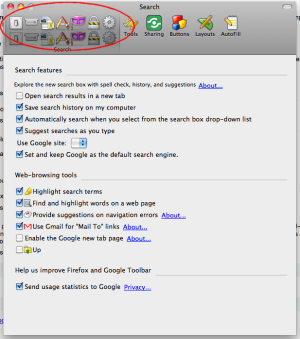
Then tried clicking Tools > Add Ons > Google Toolbar > Preferences and the Preference window was slightly bizarre with a number of buttons duplicated:

Screen shot 2010-02-15 at 9.40.13 AM

A quick Google Search found this page, and this piece of advice:

I removed everything in ~/Library/Application Support/Firefox/Profiles/<profile dir>/GoogleToolbarData

I followed the instructions, restarted Firefox and my Google Toolbar reappeared.

Firebug 1.5

Having problems with the latest version of Firebug, it doesn't like the SACK ajax library that I use a great deal (it's the same AJAX library included in WordPress).

The issue only just started, basically Firebug doesn't like the way the SACK script prepares for an AJAX call.

I found something about this in another blog post that appears to explain the issue. Firebug And The Mysterious “Components Is Not Defined”.

A commenter named Svan seems to have found the issue and a simple workaround that I'm going to try.

It seems that every plugin that wants to use the “sack” function of wordpress (for fetching ajax data), will trigger a firebug bug, due to the attempt to create ActiveXObject.

But as Firebug only is made for Firefox, I tried to switch the logic of the createAJAX inner function.
So normally, the javascript function would try to make the xmlhttp object with ActiveXObject (MS Stuff), and when that doesn’t succeed it does it the Mozilla way with XMLHttpRequest.

I changed the order:

if (typeof XMLHttpRequest != “undefined”)
this.xmlhttp = new XMLHttpRequest();

if (! this.xmlhttp) {
try {
this.xmlhttp = new ActiveXObject(“Msxml2.XMLHTTP”);
} catch (e1) {
try {
this.xmlhttp = new ActiveXObject(“Microsoft.XMLHTTP”);
} catch (e2) {
this.xmlhttp = null;
this.failed = true;
}
}
}

Entries in iCal not syncing to Google Calendar

I have iCal set up attached to my Google Calendar, and thus events entered into iCal, Google Calendar or my iPhone all happily sync up. Except today new events entered into iCal stopped appearing in Google or iPhone.

Found a quick and easy solution.

1. Exit iCal

2. Find the file [youruser]/library/calendars/calendar cache and delete it

3. Restart iCal

And hey presto entries added to iCal are syncing again.

Missing Formula Bar in Excel (for Mac)

My Formula bar was missing in Excel (Mac). Click on View > Formula Bar and the option was ticked. Tried on untick – but stayed ticked.

Closed all other tool bars, no help.

Found solution: hold down CONTROL and SHIFT keys and start Excel. Resets the tool bars and the Formula bar magically reappeared.

Javascript Frustration – Spaces in Window Names

It's the little things that drive us to an early grave. Was working on a page this morning, it had a Javascript call along the lines of:

function openPage(myPage,myTitle,settings) {

win = window.open(myPage,myTitle, settings);

}

Then I had a link on the page:

<a href="javascript:openPage('demo.asp','document view','width=600,height=400,scrollbars=yes');">Click This</a>

Works in FireFox. Get error in Internet Explorer.

Of course took me 30 minutes of messing around to realise the problem – the space in the window title. Has to be 'documentview' with no space. You'd think I'd know better after all these years, but it's the little typos that cause us the most grief most often I reckon. FireFox is more adaptable and figured out that a space didn't make the blindest difference and let it through to the keeper. IE, of course, gave a useless indefinite error and wouldn't work.

HP All in One Printer and Snow Leopard

Went to scan a document yesterday on the HP Photosmart 3310, but my Mac couldn't see the scanner – the pop up scan window kept saying scanner not found.

Played with it for ages, using the HP Device Manager thingy, but apparently the scanner was gone. But could print fine.

Finally found this document on the HP site. What do you know. The Snow Leopard upgrade breaks the HP scanner system.

But not to worry – because now it's all built into Mac, you can scan direct from Preview (very handy, straight to PDF which was what I wanted in the first place); Image Capture; or just from the Print and Fax settings.

You'll need to delete the printer from System Preferences > Print and Fax, and add it again, but that's the work of a moment.

Despite the initial frustration, actually very happy. But damn it's annoying when something simply disappears after an update and you have to go hunting for a solution. I did check for updates on the HP software and it said it was the latest version. What would be nice was if HP pushed an update that alerted you to these changes.

Check dates are valid in sql

Tearing my hair out over a query that involves manipulating and querying dates from SQL. Amongst various stuff I came across was this useful little snippet, if you have stored dates in a text field (eg nvarchar) it can tell you if the dates are valid:

set dateformat mdy

select *
from t
where isdate(startdate) = 1
    and convert(datetime, startdate) not between '19000101' and '20790606'

Keeping this one in the toolbox for another day.