I love Gmail contextual advertising. Here’s today’s fun, when viewing my Gmail Spam folder I’m offered a Savory Spam recipe.

It’s a real recipe!


Part of the fun of being a developer is keeping up with the advances, improvements and quirks in the APIs of the various online services you need to interact with. I spend a lot of time working with APIs from sites like Twitter, Facebook and SalesForce.
Late yesterday users on one of my sites started to report problems connecting their Twitter accounts, and posting to Twitter. The code on the site has been happily working for more than a year, so it felt to me something must have changed somewhere – and most likely at Twitter’s end. The error stated “There is no request token for this page”.
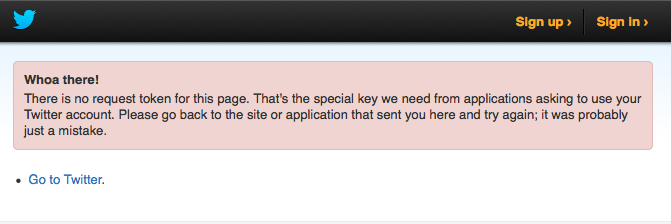
I traced the issue to the initial OAUTH call to request a token, the first step to actually issuing a full request to the Twitter API. After a little research online I discovered someone else had experienced exactly the same issue.
The solution is to specify a User-Agent in the POST, for example:
objXMLHTTP.SetRequestHeader "User-Agent", "something"
Note, this is exactly what I added – “something” seems to work fine. I’ve read that Twitter is continuing to tighten up access to their API, this issue only appeared yesterday for me, so clearly the Twitter devs have been tweaking things behind the scenes.
As a sidebar I was led up a small garden path for a short time. I tried pasting the request token URL directly into my browser and was rewarded with a message from Twitter “Failed to validate oauth signature and token”.
I played with this for a while before realising this error is almost always caused by the time clock on your server not being correct – remember, you are passing a time stamp as part of your URL, and Twitter checks that against its own internal time, if you are a little out of sync Twitter will reject the request. The time clock on my server is fine – and of course one then slaps ones forehead and realises that the time that elapsed between running your initial call, generating the URL, and pasting it into your browser is probably enough for Twitter to decide your time clock is wrong.

Came across this handy little trick the other day to refresh the Facebook cache of your web page or blog post. We all know that when you paste a link into the status box on your Facebook page it goes away and grabs information from the URL, the title, summary and one or more images that you can then select to use as the thumbnail for your Facebook post.
But what happens if you update the blog post or web page? For example, I wrote a blog post, and pasted the URL into Facebook. Before I clicked the Post button I realised I had not added an image to the blog entry. So I went back and uploaded an image, then returned to Facebook and paste the URL again. Except Facebook didn’t show the new image.
The problem is Facebook caches the URL – so the second and subsequent time you paste the URL it is not retrieving a fresh copy, simply relying on the previously scraped information.
The quick way around this is to force Facebook to scrape the URL again. Go to the Facebook Debugger page, paste in your URL and click the Debug button.

The Facebook Debugger page can be used to force a cache refresh.
Then go back to your Facebook status update and paste the URL again there. Facebook should now display the latest version of the URL.

As someone working in technology and living in Australia yet with a high degree of involvement with tech companies in the USA, I’m reminded of the massive cost differences every day between the two countries for geeks like me. So Peter Martin‘s article Soft Touches Pay the Price in today’s Age/Sydney Morning Herald simply just rubs even further a sore nerve with me.
Peter explains how companies use price discrimination to maximise profits. For example, supermarkets that manipulate the merchandising of vegetables to ensure the well-heeled pay a little more.
Price discrimination has been alive and well in technology and online, and as the technology improves, so does the discrimination become more pronounced. Amazon can display different prices for the same book depending not only on where you live, but your past purchase history. Regular buyers are charged more than new customers, presumably operating on the presumption that you’ve become comfortable with the idea of online buying and don’t require additional encouragement.
Terry Lane covered the technology price differences between Australia and the USA more than a year ago in his article Software prices defy comparison across borders. He offered up several examples of software that Australians pay more for than US residents. I know this pain first hand. Here are a couple of examples I checked today for software I use every day to earn my income:
Microsoft Visual Studio (it’s a key tool in a software developer’s armory): In the Microsoft US online store it costs $US499. In their Australian store the price is $A724. Given our exchange rate is almost at parity, and to keep the math simple, that’s a 45% premium – for exactly the same product, probably downloaded to my computer from the same Microsoft server.
Adobe Creative Suite monthly subscription: costs $US49.99 in the USA and $A62.99 to mugs like me in Australia. Not quite as eye-watering a difference as Microsoft but still a 26% premium.
What is particularly irksome about Microsoft is they deliberately penalise people ‘in the trade’, technology workers like me. Purchasers of consumer products such as the Windows operating system, and the Office suite, appear to pay the same – I compared prices and the $US and $A price tags were the same.
The cost of doing business as an Australian technologist is not confined solely to the software we use of course. Another key expense (for those of us working from home or our own small business office) is internet access. Whenever I chat with US tech friends about the cost of internet and telecommunications in Australia the conversation usually ends with them rolling around on the floor laughing silly. Because Australians pay through the nose for internet access.
I just checked the Comcast web site in the USA, one of the mainstream internet, phone and cable TV providers. I can buy a 30Mbs (=pretty darn fast) cable internet connection, plus a big bundle of TV channels, for $US49.95. Here in Melbourne, I’m paying Telstra $99 a month for my ADSL connection, and another $100 a month for my cable TV. Oh, and Telstra caps my downloads to 200Gb a month – Comcast does not appear to have any restriction. Americans historically, I believe, have not had ‘caps’ or usage limits on internet and phone plans, so again my US colleagues convulse when I explain how my son or daughter has racked up a big ‘over cap’ bill for exceeding their data allowance for the month.
All of this presumably feeds into the serious cost of living differences between the USA and Australia. I found this Cost of Living Comparison Between United States and Australia, and I compared Melbourne and San Francisco, which shows an astounding cost differential. For example, basic utilities (Electricity, Gas, Water, Garbage) are 90% more expensive in Melborne.
This is the last time I’m paying any attention to my geek friends in San Francisco moaning about how it’s such an expensive city. Because if they feel ripped off they ain’t tried paying the price of being a self-employed technology worker in Australia.
Image from Flickr artist in doing nothing
From time to time in Windows I have a program window on my second screen, I disconnect my second screen, and for some reason or other Windows doesn’t figure this out and move that window over to my primary display – my laptop screen. No amount of ALT+TAB etc solves the problem.
Here’s a way to move a window stuck on a disconnect screen over to your main display:
This worked for me, you might find that you need to use the right arrow – I settled on left because when I click the program icon in the Task Bar it seemed to show the window as being way over on the right.

The weird and wonderful world of Microsoft’s Exchange Server comes back to haunt me once in a while. We have been heavy users in the past in our ventures, but these days tend to use Google Apps.
However, one member of the family still has an Exchange-based account. Primarily because she a) doesn’t like using Gmail; b) doesn’t like using Mac Mail (we’re all Mac based).
She has had Mac Office 2004 with Entourage running happily on her MacBook Pro for several years, until last weekend when Entourage started to stall and hang a few moments after it started to check for mail from the remote hosted Exchange service.
Here’s some sense of the saga I embarked on to resolve the issue – and how I completely failed. I document it here, like many other such trials and tribulations a) so I have an archive to refer to in the future; b) in case others have experienced the same problems. I researched and came up with a list of ideas to try to fix the issue, it’s clearly similar to other peoples’ experience. So everything listed below came from a forum or other online resource.
Here’s how it panned out:
And there as of today it stands. I haven’t had time to call my partner manager. We have email running happily, and the user has her iPhone for Calendar and Contacts.
My overall plan is to shift this Exchange account over to Google Apps, and use the Google sync tool so she can continue to use Outlook. But that will take a bunch of time so will have to wait.

This week we decided to cancel our eFax.com service. A few years ago eFax was a brilliant solution for us. It enables you to have a virtual fax receiving and sending service, with a phone number in your city, but without all the bother of actually installing and paying for another line in your office.
Reality sank in the other day when I wondered aloud just how many times we had used the $18 a month service in the past year or two. Answer? Pretty much none. Email surely has killed the fax.
We mostly only maintained a fax number for the odd occasion when we needed to exchange formal documents, for example exchange a signed contract. Nowadays for most minor documents people are happy if I just drop a scan of my signature onto a PDF. And for anything important there are brilliant services like DocuSign.
So I logged into my eFax account and cast around for the option to cancel my recurrent billing and close the account, without success. I emailed the support address and received a reply saying I needed to call eFax. I dutifully did this, and spoke to a friendly woman who after ascertaining I wanted to cancel my account immediately offered me a free three month subscription. This was AFTER I had answered her question “why do you want to close the account” by saying “because we haven’t used it in at least a year”. Which I thought was pretty clear.
The support person handled it perfectly gracefully after I declined the free subscription, and within minutes the account was closed.
But I got to wondering, just how many people actually take up the three month subscription, and when the recurrent billing kicks in again, don’t just ring again to cancel the account?
What’s the strike rate? How many customers does eFax retain as a result of putting us through this offline process? My guess is not a huge number. If I’ve rung to cancel the service it’s because I’ve decided to cancel the service. Not because I’m torn, or undecided.
I wonder if it’s all worth the effort when online businesses like eFax force us to deal with them offline when we want to end our relationship?
So I log into

I’ve had a fun time the last couple of days moving this blog from its home of the last 5 or 6 years at TypePad, to WordPress.com. I made the decision for a number of reasons:
The actual move was pretty painless for those interested in the mechanics.
My one concern was for post URLs. On TypePad they all had an /eedle directory, because it didn’t actually have a domain in place, it was just http://eedle.typepad.com. I really should know better, but never got around to setting a domain up. Which meant I was faced with a bunch of URLs in Google, pointing to eedle.typepad.com – not much help if all the posts have moved over to WordPress.com.
So solution was to bite the bullet. I’ve pointed my www.eedle.com domain to TypePad, so that blog is now responding to that domain. I’ve never really used the domain for web pages – it’s mostly so I can have a cool email address like david@eedle.com.
I’ve submitted the URL to Google. I’ll use Google Webmaster Tools to tell Google to drop eedle.typepad.com URLs from the index.
We’ll let Google to its thing for a few days, by which hopefully all my pages in the index will be under http://www.eedle.com. Then I’ll move the domain over to the WordPress blog.
I know, I know, really what I should do is organise a 301 redirect on the TypePad URLs. (For the uninitiated this is an instruction to the search engines that the URL has changed).
Two reasons why I didn’t bother:
I think this has to qualify as one of the most useful things I’ve learnt in SQL Server this month. How to to use a table function in a join in a query.
It’s called the APPLY operator, and it only works on SQL 2005 and above. Here’s an example I found:
select a.PersonId, b.Passportnumber,
p.col1, p.col2, p.col3 from Person a OUTER APPLY dbo.fn_Passport(a.PersonId) p
You use CROSS APPLY when the function must return 1 or more rows to retain the Person record. Use OUTER APPLY to keep the Person record even if the function results in no rows.
CROSS APPLY similar to INNER JOIN
OUTER APPLY similar to OUTER JOIN
There’s some real power in this, for example, you can write a query that returns to the first X rows from each category of people, as illustrated by this article ‘Using CROSS APPLY in SQL Server 2005‘.
Strangest thing. I rebooted my Macbook Pro this morning. And discovered dragging and dropping files was broken. I could select a file and drag, but when I released the mouse button the file would not drop. The mouse icon remained displaying the file name.
Clicking escape seemed to release the file. I rebooted again. Still not working. I turned my Magic Mouse on and off, disconnected from bluetooth and re-paired. Still not working. Checked the track pad on the Mac itself, same problem. So it's not a Magic Mouse issue. Nor, one presumes with the mouse drivers given it's an issue with both the external mouse and the inbuilt track pad.
A Google search shows I'm not alone, this is a quirk of Mac OSX, occurs at random. Various solutions offered including deleting your mouse preferences or Finder preferences files.
And the fix is equally strange and random. Put your Mac to sleep and wake it. Worked for me.
 David Eedle