activePDF ToolKit Error Code -998

So I don't have to yet again hunt down the activePDF ToolKit documentation, if an Error Code -998 is returned by activePDF ToolKit it means 'Product not registered/ Evaluation expired.'. And you have to take up arms and prepare to enjoy chasing down why your previously registered copy has decided, perhaps in a fit of pique, that it's happier unregistered. Which is not a fat lot of help when the bloke who has the serial number database is in a timezone slumbering through the middle of the night, it's the midst of a workday for you and you promised someone something for tomorrow.

I completely agree with software licencing. It's how companies legitimately make money. But some seem to have registration management systems calculated to drive us mere code crunchers up the wall.


Get the kids to bed! How to set access times to the internet for your children

I Tweeted the other day about having to restrict my kids' internet access to ensure they go to bed, by setting time restrictions on our wifi. I've just had another person ask, "so how do you do this?", so clearly there's a number of parents out there with the same problem. Here's how I prevent my children from accessing the internet after their bedtime.

Number one point – if you don't have an Apple WiFi network, stop reading!

We have an Apple AirPort Extreme WiFi box providing our WiFi network around the house. I'll presume you have one or more Macs – iMacs, MacBooks etc – accessing the internet via WiFi and the AirPort Extreme.

You will need to know the mac address of those computers. The mac address is nothing to do with Macintoshes, just a coincidence of naming. The mac address of a computer is a unique identifying number.

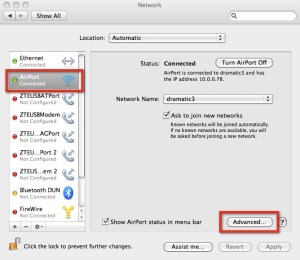
On the computer click the Apple menu (top left next to the Finder option), then click the System Preferences option. When the Preferences open click the Network icon. On the Network window you should see the AirPort connection on the left hand side. If it's not highlighted, then click it. Then click the Advanced button.

2010-11-16_17-43-35

The window that opens should display the AirPort Id. Write this down.
2010-11-16_17-43-35

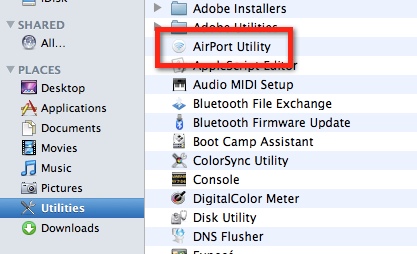
Next open your AirPort Utility. It's in the Utilities folder in the Applications folder.

2010-11-16_17-45-43

The AirPort Utility will open and your AirPort Extreme should be listed. If it's not highlighted (maybe you have more than one WiFi gadget), then click it, then click the Manual Setup button.

2010-11-16_17-46-49

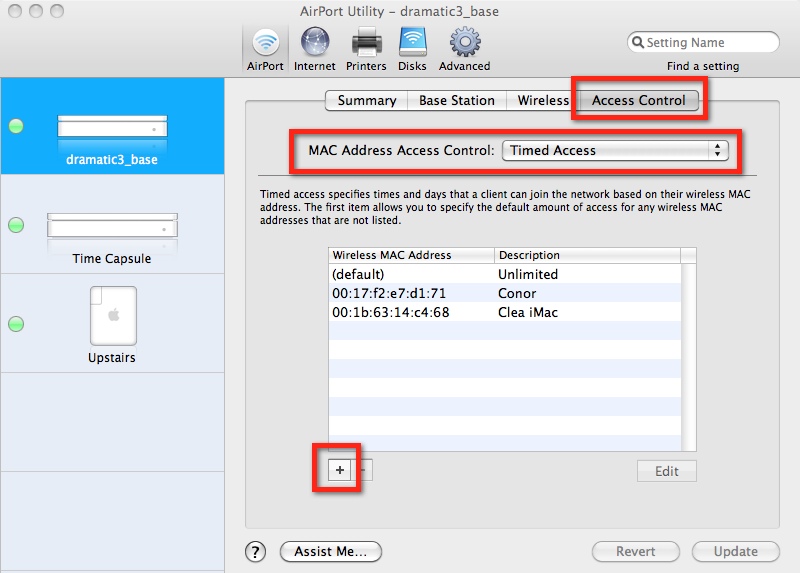
Your Extreme settings should load and display. Click the Access Control tab at the top right. The window will display your MAC Address Access Control page.

Set the Control to Timed Access. You should have a (default) entry called Unlimited. This means that if you don't set anything else up, everyone on your WiFi network can access the internet all the time.

2010-11-16_17-47-45

Click the + button to add a new entry to the list. Enter the Mac address of the computer you want to restrict access for. Enter a description, then set the days and times as you wish. You can have more than one entry. For example, you might want to give the kids internet access until 9pm on school days, but 11pm on the weekends.

2010-11-16_17-49-02

When you are finished click the Done button to close the Access window, then cick Update. The settings will be saved to the Extreme box, which will then restart, so you'll need to wait a minute or two for everything to start working again.

The only thing left is to test – which is easy. Just wait until the magic time you've designated the internet access to cease, and see how loudly your kids yell!

ASP Timeout expired error: Microsoft OLE DB Provider for SQL Server error ‘80040e31’

I was working on an ASP page today that included an AJAX call off to trigger various SQL updates, amongst which was a call to a stored procedure. The page started to error with:

Microsoft OLE DB Provider for SQL Server error ‘80040e31’
Timeout expired

The error line was the call to the stored procedure. After a bit of fiddling around I traced the issue to the ADO ConnectionTimeOut value. By default this is 30 seconds.

There are, I guess, 3 timeout values of interest on an ASP page:

1. Session timeout

How long the user’s browser session will last. On IIS this is defaulted to 20 minutes

2. Script timeout

How long a page can take to complete. On IIS this is defaulted to 90 seconds.

3. Connection timeout

How long a single call to the database can take to complete. This defaults to 30 seconds.

The stored procedure was taking > 30 seconds, hence throwing an error. I solved the problem by increasing the ConnectionTimeOut value for the particular call to the stored procedure, eg:


Dim cmdC
Set cmdC = Server.CreateObject("ADODB.Command")
with cmdC
.ActiveConnection = conn
.CommandText = "[procedure name]"
.CommandType =adCmdStoredProc
.CommandTimeout = 3000
.Execute
end with


The value is in seconds, so 3000 seconds = 5 minutes. You can read more about ConnectionTimeOut here.

Of course, there’s a whole other discussion why we have a stored procedure taking so long to run as part of an AJAX call. We’ll probably shift it off to a scheduled job or something eventually but we needed a quick fix for the interim.

Displaying code in your TypePad blog

Yesterday I wanted to show some SQL code in a blog post, and realised I'd never figured out how some blogs are able to display beautifully formatted, in living colour, code in their posts.

A quick Google and all was revealed: SyntaxHighlighter from Alex Gorbatchev. I then found a handy 'how to' install SyntaxHighlighter into a TypePad blog from Damien Krotkine. Five minutes later I was up and running.


Looping through records in SQL Server Stored Procedure

Someone who’s pretty good programming on the front end, but not so crash hot on the backend, eg SQL Server, asked me the other day about looping through recordsets in a SQL Server Stored Procedure.

It is of course possible to use a cursor and FETCH but most SQL programmers frown on cursors in stored procedures. Cursors involve grabbing a bunch of records and locking them, there can be a substantial performance hit. They should really only be used as a last resort, for example, where you don’t have a good enough unique key value on your rows (although there are ways around that one usually as well).

The easiest way I know to look through records is to employ a temporary table, here’s a simple example:


-- Create a temporary table to hold the records to be updated
DECLARE @uniqueId int
DECLARE @TEMP TABLE (uniqueId int)
-- Insert into the temporary table a list of the records to be updated
INSERT INTO @TEMP (uniqueId)
SELECT uniqueId FROM myTable
-- Start looping through the records
WHILE EXISTS (SELECT * FROM @TEMP)
BEGIN
-- Grab the first record out
SELECT Top 1 @uniqueId = uniqueId FROM @TEMP
PRINT 'Working on @uniqueId = ' + CAST(@uniqueId as varchar(100))
-- Perform some update on the record
UPDATE myTable SET myField = 'something or other' WHERE uniqueId = @uniqueId
-- Drop the record so we can move onto the next one
DELETE FROM @TEMP WHERE uniqueId = @uniqueId
END


Cricket Scoring Signals and Symbols

Our 10yr old has started playing cricket this summer (we'll add that to his weekly sporting roster of tennis, indoor soccer, basketball etc). I've been roped in to score the matches for his team – and by roped in I mean there was a deafening silence reverberating around the assembled group of parents at the first match when our coach asked if anyone would like to volunteer.

Actually, it's quite a pleasant way to spend a Saturday morning, although of the first 5 weeks of the season 2 games have been washouts, 2 played in the cold and rain, with only the most recent last Saturday enjoying anything approaching what might be termed weather that one might expect for cricket, warm and sunny.

For my part I've been forced to rummage in my memory of how cricket works – my last exposure was as a 9 or 10 year old at boarding school in England, where I was considered such a liability to the school team I usually was appointed 'tally-wagger', a peculiar job description applied to the person who turned over the numbers on the score board at the behest of the scorers (see, I wasn't even allowed to keep the score, the limit of my expertise was considered to be tugging on the string that made the numbers flop over in turn).

It turns out scoring cricket is not so much maths, as frantic application of a pencil to a score book, where denoting even just a simple run requires annotations in three or four different places. And given these are little kids, who don't need much of a run up to bowl a ball, they rattle through the overs at a quick pace, so blink and you miss something. There are lots of symbols you need to be across in order to properly record each ball of each over, and the resulting score or outcome that might eventuate.

An opposition scorer, new to the task like me, has put me onto a handy cheat sheet of the signals umpires used to indicate what just happened, and the symbols used to record the outcome, from the NSW Cricket Umpires & Scorers Association.


iPad stencil for Omnigraffle

I've spent part of today scoping the screens for a new iPad application for a client. I normally use the wonderful Omnigraffle for this type of thing, so went hunting for iPad stencils for Omnigraffle and found:

This worked perfectly (just download, unzip, and place the stencil files into users/library/application support/omnigraffle/stencils.

These guys have a nifty app called Writer that I really must take a closer look now I know that one of my gods Stephen Fry knows its name.


Twitter sure handles a lot of messages

Been battling some Twitter code I wrote a few months ago that first posts a status update to a Twitter account using /statuses/update.json, then allows a user to retweet using /statuses/retweet/[tweetMessageId].json to another Twitter account.

When I tried the routine this morning it steadfastly refused to send the re-tweet. The Twitter api just returned 'Not Found'.

I tore all the routines apart, added debugs everywhere, without success. Then, staring at the returned JSON values, with the database open on another screen, I finally twigged.

When I post the Tweet I'm grabbing the message ID number and saving that to the database. Then, when I want to retweet, I use that message id in the retweet end point.

A couple of months ago the message Ids were 11 digits long, now they are 16 digits. I'd been grabbing the 'id' value coming back from Twitter, but a number that long was getting truncated by my JSON parse routine (I'm using the very handy JSON2 library). I checked the JSON values and Twitter very kindly also sends back 'id_str', which is the message id as a string. For example the JSON contained:

"id":1436631697457152

"id_str":"1436631697457152"

Indeed, now I look more closely, I can see that they also send back the ID of the Twitter account using the same, for example:

"id_str":"112303018"

I guess the explosion in the message Id in the past few months just continues to underscore the remarkable growth in Twitter's scale, presuming the message ID values have simply been incrementing sequentially over that time and haven't been jumped ahead manually for some reason.


Saving Voicemails and Text Messages to your Mac from your iPhone

Had cause today to want to retrieve and archive voicemails and text messages from my iPhone4 to my Mac. Hunted around a little bit – for example found advice that the only way to transfer a voicemail to my Mac was to plug in an audio cable from the iPhone's headphone jack to the Mac and essentially 're-record' the audio of the message.

That didn't sound too much like fun, then came across Decipher Media and their iPhone Tools. Isn't it nice when someone offers software that does exactly what you want, in a simple, understandable fashion, at a price that doesn't affect whether you eat for the remainder of the week.

They have two products, one called DecipherTextMessage, and another called DecipherVoiceMail. Bundle was $7.99.

You install the software to your Mac. You backup your iPhone (via iTunes). You run the programs and they retrieve your text messages and voicemails from the backup files on your Mac – note, NOT from your iPhone.

Interestingly not only did they find messages from my iPhone4 (which I've only had for a few weeks), but also my previous iPhone – whose backup is clearly still hiding away on my Mac.

For example, despite the fact I have long ago deleted many of the text messages, it retrieved an entire exchange of messages between myself and someone, starting from October last year.

You can save the text messages out as a text file – so easily searchable. And save the voicemails out as MP4.

If you are engaged in some kind of dispute, negotiation or other action where you want to ensure you are maintaining robust records of communications I reckon $7.99 is a tiny price to pay. For a start would have thought lawyers should have this by default.

Not sure there's a Windoze version though for all of those people who have not converted to the alter of Jobs.


Taking screenshots on iPhone and iPad

It's the little things that you learn that make life easier. I wanted to screenshot the RushCrowds iPhone app this morning, turns out is easy:

  1. Open the screen you want to copy
  2. Hold down the power and the home button at the same time for a second then release, the screen flashes white and you hear a camera click. (The power button, which might be officially called the sleep button I suspect, is the one at the top right, the home button is the round button at the bottom middle).

It saves the screenshots to your Photos, so you can email them, or just sync over to iPhoto.